3

On my VPS, I have centOS 6.5 installed with 2 virtual cpu 2048 MB memory, 60 GB disk and 300 GB monthly data. Doing a speed test today resulted in 168.62 Mbit/s dload and 37.39 Mbit/s upload.

Then my own speed at home computer is woeful at dload 1.76 Mbps and upload 0.31 Mbps

So anyway I use openmeetings by apache on above vps which works ok here in Australia but the other day when I attempted having a meeting in the States the latency was so so bad that the other user screen was frozen with no sound. As soon as I switched to meet them on their installed gotomeetings everything was fine which made me realise either my vps is way too slow to run live streaming video and/or my system settings are not anywhere near optimum.

Where to start making improvements or am I kidding myself with the speed of my virtual slice ever being enough to handle live multi user video streaming? As openmeetings is created by apache I am guessing it uses a lot from both apache and mysql to run- would that impact on speed?

Openmeetings has own network test and resulted enter image description here
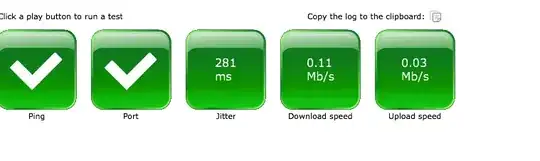
What would be considered minimum upload speed necessary for multiple user video conferencing under 50 at one time in one hour duration and what change of settings in apache and mysql could optimise speed?

cea
  • 1,523
  • 8
  • 30
  • 45
  • Sorry, where is your VPS located (physically)? Quite possible the issue is the Australia <-> US connection. – derobert Apr 23 '14 at 03:27
  • VPS located in Sydney and yes it is an issue between Aus<->US specifically that I have seen for myself. – cea Apr 23 '14 at 05:34
  • No specific experience with Apache Open Meetings, but I'd guess it's not a latency issue, but rather packet loss, limited bandwidth, or jitter. Ideally you'd be able to get network stats out of Open Meeting. Latency should cause awkward pauses between you asking a question and the other guy answering, not video freezes. – derobert Apr 23 '14 at 05:45
  • Yes I have the output for that jitter 281 ms dload 0.11 upload 0.03 !! – cea Apr 23 '14 at 05:50

1 Answers1

1

It sounds like you have all the resources you need. The problem may be in the VPS provider's network. Use mtr to check the latency between you and your VPS. It's basically a continuous traceroute on steroids. It won't tell you if your provider is currently getting DDOS'd, but it will give you an insight into if/where you're hitting a bottleneck.

Run mtr on your local machine, not the VPS. Say for example your VPS's ip is 192.168.100.100:

$ mtr 192.168.100.100

That will continuously perform a traceroute to 192.168.100.100 while generating some metrics about the results. This can give you an idea about any possible network congestion between you and the destination.

If there is packet loss at any of the nodes within the same /16 subnet or within 2-3 hops of the endpoint then this can indicate that your VPS provider is experiencing network issues.

Creek
  • 5,002
  • 1
  • 22
  • 33
  • ok i installed mtr and ran the command mtr and i see it outputting but have no idea what it means. – cea Apr 23 '14 at 05:47
  • Each host is a router. If there is a host with a high packet loss % and/or high latency then that indicates a network bottleneck. – Creek Apr 23 '14 at 13:30
  • Well don't know how long to watch it but I have seen no such indication. Trouble is unless I was using said software it would not show up and even if it did show up this still doesn't help me alleviate the problem. Your answer is a diagnostic tool and I appreciate you putting it forward but it doesn't help me really sort it out. It is too vague. I am sorry my question is broad but I don't actually know where to look first and make changes or even if I can with current system. – cea Apr 23 '14 at 23:46
  • @cea with all due respect, you described a symptom, not really a problem. You need to track down what's causing this before you can expect people to suggest solutions. Personally, based on your description of what you're seeing, I'd look at CPU and memory resources before drilling into the network. – Belmin Fernandez Apr 24 '14 at 02:53
  • @Creek ok I understand now how this is useful, thanks. – cea Apr 24 '14 at 04:40
  • @Beaming Mel-Bin none taken...The question is sourcing the problem to alleviate the symptom. :) in other words solving the symptom by investigating and finding the source. – cea Apr 24 '14 at 07:42