4

I use OpenSuse 13.1 (with KDE). On my phone I can turn on a hotspot just by pushing a button. I have been researching how to do this on linux, I haven't found an easy way yet.

What I want to achieve: I have a wired connection. I want to share this through a wireless connection (so that my phone can access the internet).

I read that I could do this with an ad-hoc network. Is this correct or is this something different still? I did try this, new network (regular and shared I tried) -> mode: ad-hoc -> I gave in a ssid "hotspot".

But it is not being detected by my phones. Perhaps ad-hoc is not allowed for them?

Any suggestions?

-- update

I have added the steps I have tried graphically:

  1. Add new network: I need to choose between wireless and shared. I have tried both. But I presume it is wireless?

see screenshot

  1. Set a name and as ad-hoc (or infrastructure) network. -> none of the two seems to be detected by android or iphone.
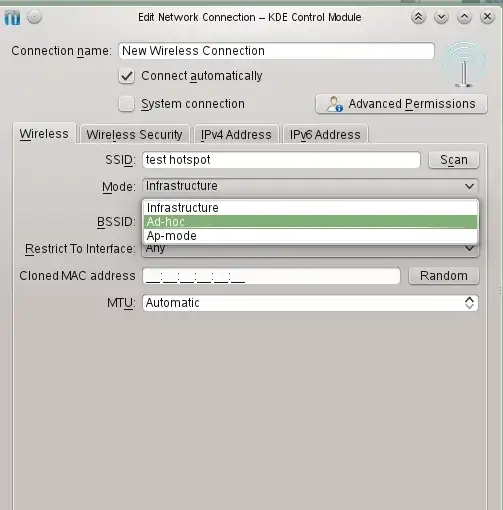
see screenshot

  1. I am connected by cable, do I also need to connect to the wireless (by dubble clicking it?)

Am I missing something obvious? Or a missing host service/server? Etc... because none of the ad-hoc or infrastructure networks are showing on my cell phone.

I am using knetworkmanager now (kde). If I can do it command line, would also be ok.

--update

I have executed the following commands error free:

   nmcli nm wifi off
    rfkill unblock wlan

    ip link set dev wlp1s0 up
    ip address add 192.168.5.1/24 dev wlp1s0

    iptables -t nat -A POSTROUTING -s 192.168.5.0/24 -o enp0s20u2 -j MASQUERADE
    sysctl -w net.ipv4.ip_forward=1 1> /dev/null

    systemctl start hostapd.service
    systemctl start dnsmasq.service

My /etc/hostapd is:

interface=wlp1s0
driver=nl80211
# bridge=br0
channel=3
hw_mode=g
auth_algs=1
ssid=test

My phone sees the test network. But keeps saying "Obtaining IP address...."

I feel that I am very close now...

dorien
  • 333
  • 2
  • 5
  • 12
  • sorry, I'm lost. mostly because I don't use KDE. – strugee Apr 19 '14 at 00:52
  • Works now at least since Leap. Do not use AdHoc. Follow this NetworkManager Tutorial on youtube that I just tested on Tumbleweed, while the video shows Leap 42.1. https://www.youtube.com/watch?v=auQ5tC1u6fM​ –  Mar 30 '16 at 08:54

3 Answers3

2

I don't know about Windows Phones or iPhones, but Android phones cannot detect ad-hoc networks out of the box. You will probably need to use infrastructure mode in order for your phone to see your network. Alternatively, search for Android add-ons that enable connections to ad hoc wifi networks (success seems dependent on the device and Android version).

Gilles 'SO- stop being evil'
  • 807,993
  • 194
  • 1,674
  • 2,175
strugee
  • 14,723
  • 17
  • 73
  • 119
  • I have an android phone. How would I switch to infrastructure mode? You mean on the the phone right? – dorien Apr 17 '14 at 21:18
  • 1
    no, your hotspot needs to be in infrastructure mode. – strugee Apr 17 '14 at 21:21
  • It is not showing in infrastructure mode as well. So I created shared wireless network, mode: infrastructure. Do I need to connect to it on my pc as well? – dorien Apr 18 '14 at 10:15
  • The first choose when adding a network is "shared or wireless". Which do I choose here? – dorien Apr 18 '14 at 11:27
  • @dorien I don't know. that doesn't really make sense to me. – strugee Apr 18 '14 at 15:17
  • I have updated my question to include screenshots so that is hopefully more clear. I will look for an ad-hoc app. But still, it would be nice if I can share the network with visitors, so infrastructure mode seems better then. But how? – dorien Apr 18 '14 at 19:04
2
  1. Install HostAPD:
    yast -i hostapd
  1. Configure hostapd in the file /etc/hostapd.conf, especially consider the settings (ESSID will be test, driver will be for the WLAN driver, bridge will be for the bridge you create later on, channel is arbitrary, hw_mode=g means the speed as in A/B/G/N).
    driver=nl80211
    bridge=br0
    channel=3
    hw_mode=g
    auth_algs=1
  1. Start hostapd:
    hostapd /etc/hostapd.conf
  1. verify that you see a WLAN with the ESSID test, e.g. on a mobile phone

  2. add a network bridge on your Linux computer (assuming wlan0 is your wireless network device and 192.168.0.5 is a free IP address in your subnet):

    brctl addif br0 wlan0
    ifconfig br0 192.168.0.5
  1. now you will probably want to have your Linux computer as a NAT gateway into the internet so you will do about (assuming ppp0 is the device you use to get into the internet as it is typically the case with UMTS modems):
    echo 1 > /proc/sys/net/ipv4/ip_forward
    iptables -t nat -A POSTROUTING -o ppp0 -j MASQUERADE
    iptables -A FORWARD -i br0 -j ACCEPT
    iptables -A FORWARD -i wlan0 -j ACCEPT 
  1. Now you will want to have your Linux computer as dhcp server so connecting devices will be informed that this computer is their gateway.

  2. Now you will want to introduce security features like WPA so your communication cannot be evesdropped.

I blogged this under http://www.linuxintro.org/wiki/Set_up_a_wireless_accesspoint

Thorsten Staerk
  • 3,687
  • 1
  • 22
  • 28
  • Thank you very much for the info. However, I have a different driver, (not nl80211), which I think has some trouble with this method? # lspci -k | grep -A 3 -i "network" 01:00.0 Network controller: Intel Corporation Centrino Advanced-N 6235 (rev 24) Subsystem: Intel Corporation Centrino Advanced-N 6235 AGN Kernel driver in use: iwlwifi – dorien Apr 18 '14 at 19:39
  • I tried it anyway and I get an error: hostapd /etc/hostapd.conf Configuration file: /etc/hostapd.conf Could not read interface wlan0 flags: No such device nl80211 driver initialization failed. – dorien Apr 18 '14 at 23:03
  • Ok, with iwlist scanning, I found the interface name was wlp1s0, so I changed that in the config file. Then I got this error: hostapd /etc/hostapd.conf Configuration file: /etc/hostapd.conf nl80211: Failed to set interface wlp1s0 into AP mode nl80211 driver initialization failed. – dorien Apr 18 '14 at 23:12
  • 1
    From what I am testing, my card does not support master mode (see http://askubuntu.com/questions/319838/failed-to-set-interface-wlan0-into-ap-mode-intel-centrino-n1000-wireless). I have an intel card, not sure how to check which type. (dell xps13) – dorien Apr 18 '14 at 23:17
  • ok, my wifi info (lspci -vq): .0 Network controller: Intel Corporation Centrino Advanced-N 6235 (rev 24) Subsystem: Intel Corporation Centrino Advanced-N 6235 AGN Kernel driver in use: iwlwifi – dorien Apr 18 '14 at 23:18
  • 1
    Could you paste the output of hwinfo --netcard | grep -Ei "model|driver" – Thorsten Staerk Apr 19 '14 at 03:35
  • That outputs: Model: "Intel WLAN controller" Driver: "iwlwifi" Driver Modules: "iwlwifi" Driver Info #0: Driver Status: iwlwifi is active Driver Activation Cmd: "modprobe iwlwifi" Model: "ASIX Electronics AX88x72A" Driver: "asix" Driver Modules: "asix" Driver Info #0: Driver Status: asix is active Driver Activation Cmd: "modprobe asix" – dorien Apr 19 '14 at 08:02
  • 1
    yikes! With my iwlwifi device I get exactly the error that you describe. I could work around this by using a USB WLAN stick from Conceptronic... however I need to improve and come back here I see. Hope the USB WLAN stick helps so long for you. – Thorsten Staerk Apr 19 '14 at 18:29
  • That would mean that I need a different wlan card? I would prefer to keep using this one. – dorien Apr 26 '14 at 11:37
  • I am pretty sure your answer is the way to go and I will accept it as soon as I can resolve the driver thing. I have created a seperate issue out of this, so it is hopefully solved sooner. http://unix.stackexchange.com/questions/126632/setting-up-hostapd-with-a-iwlwifi-device-to-run-a-hotspot – dorien Apr 26 '14 at 11:58
0

Have you tried the ap-hotspot method? It takes your Ethernet cable and sends it out wirelessly. Not as ad-hoc. That is something else, I use the method quite often.

Article here.

Anyway, here's how it works. You can think of this as reverse tethering as long as you are Ethernet-connected. I wrote the article quite a long time ago, so I know it works but other than what's written there, don't know what else I can say.

Mike Wentworth
  • 293
  • 2
  • 5
  • 11
  • That sounds great. I am using opensuse (rpm based), am looking for a version... – dorien Apr 18 '14 at 19:26
  • Unfortunately ap-hotspot seems to be only for deb based? – dorien Apr 18 '14 at 19:33
  • Hey, sorry about that. No, I also used it under KDE because it's only from terminal. What made you say that? I can confirm that it works on Kali, Ubuntu, KDE and it has been tested on OpenSuse but I don't know the results. – Mike Wentworth Apr 18 '14 at 19:41
  • Have you tried installment from the terminal like the article mentioned? – Mike Wentworth Apr 18 '14 at 19:41
  • apt-get is an ubuntu specific command, it will not work for opensuse or an rpm based distro. – dorien Apr 18 '14 at 22:59
  • It has worked before though. But there are different commands which I am unaware of. Usually this method works. Kali Linux is also not apt-get capable but it does work if you install. – Mike Wentworth Apr 18 '14 at 23:00
  • But Kali is debian based, perhaps that is a difference. I tried adding the repo nilarimogard/webupd8 to my repositories, but it said it is not a valid repository. – dorien Apr 18 '14 at 23:07
  • hi and welcome to Stack Exchange! here, link-only answers are discouraged. what if the site hosting the link goes down? please summarize the essential parts of the article and paste it here. even a straight-up copy and paste is better than a link, as long as you format it as a quote and cite it properly (in this case, cite yourself, of course). – strugee Apr 19 '14 at 00:54
  • Considering it's my site and my servers, they won't ever go down. But I understand your point, note taken. Will do this. – Mike Wentworth Apr 20 '14 at 01:55
  • +dorien, I'm sorry man, I honestly have no experience using ap-hotspot with non-debian based OSes myself. I would be happy to try and help look, but I can offer no valuable answers as of yet. – Mike Wentworth Apr 20 '14 at 01:56