24

Does the command line have a way to get a recommended list of programs used to open a particular file, based on the file type? For example, a .pdf file would have an open with... recommendation using the programs Evince and Document Viewer.

I use the command line for most things, but sometimes I forget the name of a program that I want to use to open a particular type of file.

BTW I am using Ubuntu 13.10.

pro-tip

Thanks to @slm 's selected answer below, I made the following bash script in a file called openwith.sh:

xdg-mime query default $(xdg-mime query filetype $1)

Add as an alias or execute directly as an openwith command.

Rui F Ribeiro
  • 55,929
  • 26
  • 146
  • 227
modulitos
  • 3,097
  • 8
  • 29
  • 44
  • 1
    You can try with `gnome-open file`. I have added `alias o='gnome-open'` to my `.bashrc` for simplicity. – Pål GD Apr 15 '14 at 08:18
  • `gnome-open` works similarly to `xdg-open`. – slm Apr 15 '14 at 12:44
  • Apparently, so does `gvfs-open`. Question [What can I use instead of gnome-open?](http://askubuntu.com/questions/68961/what-can-i-use-instead-of-gnome-open) from [ask ubuntu](http://askubuntu.com/). – Pål GD Apr 15 '14 at 13:30

4 Answers4

33

There isn't a command that I've ever seen that will act as "open with..." but you can use the command xdg-open <file> to open a given <file> in the application that's associated with that particular type of file.

Examples

Opening a text file:

$ xdg-open tstfile.txt
$

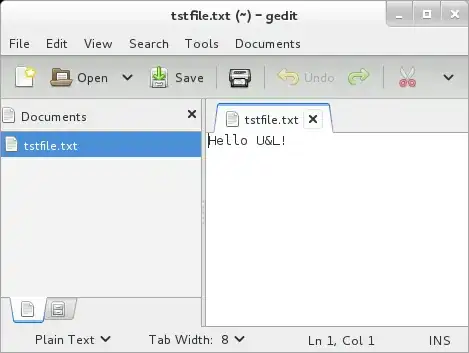
Resulting in the file tstfile.txt being opened in gedit:

                         ss of gedit

Opening a LibreOffice Writer document:

$ xdg-open tstfile.odt 
$

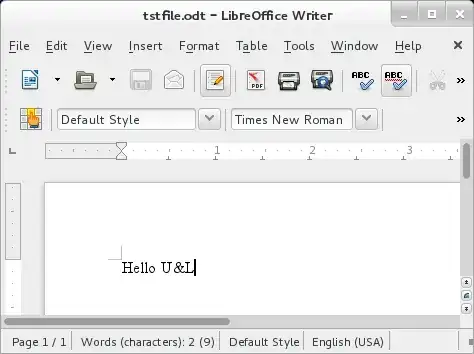
Resulting in the file tstfile.odt being opened in Writer:

                         ss of writer

What apps get used?

You can use xdg-mime to query the system to find out what applications are associated to a given file type.

$ xdg-mime query default $(xdg-mime query filetype tstfile.txt)
gedit.desktop calibre-ebook-viewer.desktop

$ xdg-mime query default $(xdg-mime query filetype tstfile.odt)
libreoffice-writer.desktop calibre-ebook-viewer.desktop

This is a 2 step operation. First I'm querying for the mime-type of a given file, xdg-mime query filetype tstfile.txt, which will return text/plain. This is then used to perform another lookup to find out the list of applications that are associated with this mime-type. As you can see above I have 2 apps associated, gedit and calibre, for .txt files.

You can use xdg-mime to change the associations too. See man xdg-mime for more details.

slm
  • 363,520
  • 117
  • 767
  • 871
  • Is there a way to display other kinds of programs besides the default ones? For example, I just installed `okular` to view PDF's, but your example above only shows `evince` when I run it on a .pdf file. – modulitos May 06 '14 at 21:01
  • 1
    @Lucas - yes the examples I've shown show the applications that are associated with a given file type above. For ex. files of type `.txt` are associated with gedit and calibre for example. – slm May 06 '14 at 23:37
  • Do I need to have `.desktop` files for the programs that I want listed? For example, when I run the script on a `.pdf` file, it returns `evince.desktop`, even though I can run `okular` as well. – modulitos May 07 '14 at 05:53
  • @Lucas - this is probably best asked as a new Q, since we're meandering away from the original Q now. – slm May 07 '14 at 06:27
5

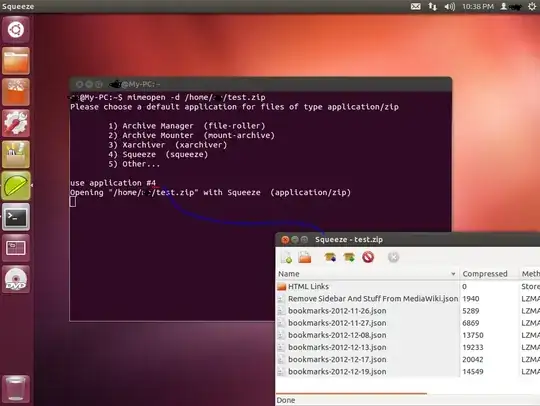
Sort of, but it will change your default application as a result. I'm not sure what other operating systems this works on, but the instructions below work for Ubuntu 12.04 - Desktop X86-64. I didn't have any pdf files handy so I tested with a .zip archive.

General Steps

Step #1

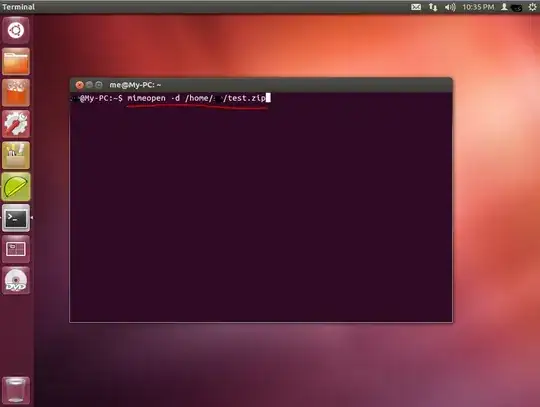
In a terminal type:

$ mimeopen -d /home/username/example.zip
screenshot #1 = https://copy.com/qfWSZaZ4FzlA

    ss #1

Step #2

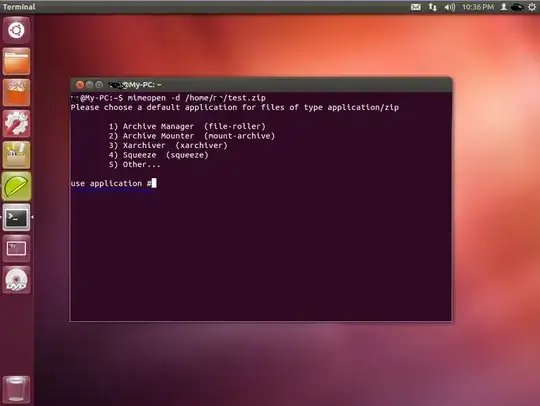
Choose from the list by entering the # of the application you want, and pressing enter. The file will immediately open in the application you chose.

screenshot #2 = https://copy.com/um6Rf7zRdceT

    ss #2

screenshot #3 = https://copy.com/ytwKCqR6nv8i

    ss #3

Notes

Note #1

This changes the default application to the one you choose, and so any time you open that file type it will now open in whatever application you last chose from the list.

slm
  • 363,520
  • 117
  • 767
  • 871
please delete me
  • 287
  • 5
  • 11
5

If you mostly work on the command line, you could look at a curses-based file manager, like ranger or vifm. Both allow you to define default actions for filetypes.

In vifm, for example, in ~/.vifm/vifmrc you can define associations like so:

" Images
filetype *.jpg,*.jpeg,*.gif,*.tif,*.png,*.bmp sxiv 

" Media
filetype *.flv,*.avi,*.mp4,*.mpeg,*.mpg,*.mov,*.ogg,*.ogv,*.mkv mpv 

" Web
filetype *.html,*.htm,*.shtml /home/jason/Scripts/vimprobtab.sh 

" PDF
filetype *.pdf apvlv

Hitting Enter whith the cursor on any file with one of the defined actions will see it opened by the relevant application. As you can see in the case of .html files, you can trigger a script as well as an application.

jasonwryan
  • 71,734
  • 34
  • 193
  • 226
3

Depends on the flavor of Unix you're using, I guess. In OS X, you can use the open command:

OPEN(1)                   BSD General Commands Manual                  OPEN(1)

NAME
     open -- open files and directories

SYNOPSIS
     open [-e] [-t] [-f] [-F] [-W] [-R] [-n] [-g] [-h] [-b bundle_identifier]
          [-a application] file ... [--args arg1 ...]

DESCRIPTION
     The open command opens a file (or a directory or URL), just as if you had
     double-clicked the file's icon. If no application name is specified, the
     default application as determined via LaunchServices is used to open the
     specified files.

     If the file is in the form of a URL, the file will be opened as a URL.

...
  • Also, the `open` command first appeared in NextStep and was inherited by OS X, so it _may_ be available in some form on other more or less OpenStep-based platforms (e.g. AfterStep, LiteStep). – Ionoclast Brigham Apr 15 '14 at 16:26