These /dev nodes appear because the standard PC serial port driver is compiled into the kernel you're using, and it is finding UARTs. That causes /sys/devices/platform/serial8250 (or something compatible) to appear, so udev creates the corresponding /dev nodes.
These UARTs are most likely one of the many features of your motherboard's chipset. Serial UARTs in the chipset are quite common still, even though it is becoming less and less common for a DB-9 connector to be attached to these IC UART pins.
On some motherboards, there is a header connector for each serial port, and you have to buy an adapter cable if you want to route that connector to the back of the PC:
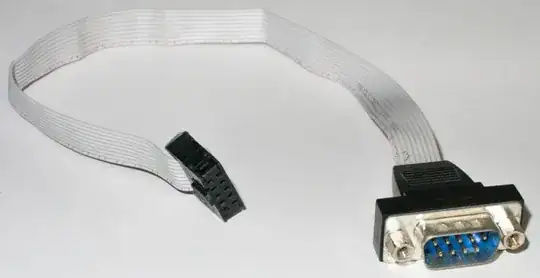
Other motherboards using the same chipset might not even expose the header connector, even though the feature is available in silicon, purely to save a bit of PCB space and a few cents for the header connector.
A few serial UARTs add negligible cost to a mass-produced PC chipset IC, whereas it adds a few dollars to the final retail cost of a motherboard to run a DB-9 connector out to the board edge. There is also a cost in PCB space; space at the board edge is especially precious.
There is no standard way to probe for the existence of a device connected to an RS-232 serial port.
Contrast USB, where the mere presence of a port on the motherboard doesn't cause a /dev node to be created, but plugging a device in does, because there is a fairly complex negotiation between the device and the host OS. In effect, the device announces itself to the OS, so udev can react by creating an appropriate /dev node for the device.


