62

I am defining common bash files which I want to use across different distributions. I need a way to check if system is using systemd or sysvinit (/etc/init.d/). I need this so I run appropriate command to start the service. What would be safe way to check for this? I currently check for existance of systemctl command, but is that really an option as there might be the case where systemctl command might be available, but it wouldn't necessarily mean that systemd is actually used?

Here is an excerpt from my current bash script:

#!/bin/sh
if [ command -v systemctl >/dev/null ]
then
    systemctl service start
else
    /etc/init.d/service start
fi
Gilles 'SO- stop being evil'
  • 807,993
  • 194
  • 1,674
  • 2,175
ek9
  • 2,875
  • 3
  • 18
  • 27
  • That question was more related when creating an installer package and the general consensus on the answer was to implement it in a different way. I feel that my question provides a different case, which could provide a different solution/answer to this. I will keep it open for some time and delete it if it does not get any attention. – ek9 Mar 26 '14 at 20:46
  • Unfortunately, there is no clean, surefire way of doing this. You should also have a look through [this](http://unix.stackexchange.com/q/114613/22222) Q&A for some possible workarounds. – terdon Mar 26 '14 at 21:27
  • on rpm distros, `rpm --quiet --query systemd`. this avoids the hanky panky involved in looking for a process or pid or symlink. – Trevor Boyd Smith Jan 09 '18 at 19:08
  • Related (my answer I just added): [Check to see if my system _has `systemd` available_](https://unix.stackexchange.com/a/713240/114401) – Gabriel Staples Aug 11 '22 at 01:11

1 Answers1

55

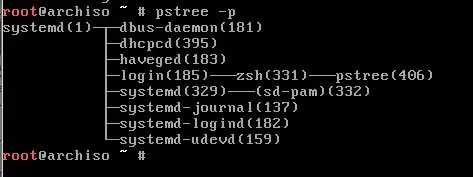
Systemd and init have pid = 1

pidof /sbin/init && echo "sysvinit" || echo "other"

Check for systemd

pidof systemd && echo "systemd" || echo "other"

enter image description here

  • 7
    When will that _not_ echo `sysvinit`? AFAIK, all (or most) init systems will have a PID of 1, that's kind of part of the definition. – terdon Mar 26 '14 at 21:23
  • well, than the other way will be correct? –  Mar 26 '14 at 22:11
  • No, for example Ubuntu with upstart still reports `/sbin/init`. Have a look at @slm's answer in the linked dupe for more details. – terdon Mar 26 '14 at 22:15
  • I meant if checking for systmed as showed last is ok? –  Mar 26 '14 at 22:16
  • Ah, yes, that's better, downvote retracted. – terdon Mar 26 '14 at 22:23
  • 1
    Commenting to say that the check for systemd works on Ubuntu 14.04, 15.04 and 15.10, but not on debian jessie 8.2. – Jose Diaz-Gonzalez Jan 02 '16 at 09:00
  • On my old Debian I get both "sysvinit" and "systemd" – Giacomo Catenazzi Mar 01 '16 at 16:33
  • 37
    First solution is wrong because `/sbin/init` is probably symbolic link to `/lib/systemd/systemd`. To check it run [`file /sbin/init`](http://linux.die.net/man/1/file). – patryk.beza Aug 08 '16 at 09:57
  • 11
    +1 for `pstree -p`, -1 for the rest of this answer. – Darren Cook Jan 17 '17 at 09:27
  • 8
    -1 for the misleading `pidof init` as it may be a symbolic link to `systemd`. +1 for the comments here that have more than sufficient answers to help who comes here. Try for example: `[[ -L "/sbin/init" ]] && echo 'systemd' || echo 'systemV'` – DrBeco Mar 27 '17 at 13:25
  • Actually this doesn't work with Ubuntu. with `pidof systemd` doesn't show the correct systemd id. Rather, it would be useful if you use the following instead: `cat /proc/1/status|egrep -i 'name|state'` because systemd replaces sysvinit with the id == 1 in the system process. Hope this helps – toytoy Dec 07 '17 at 00:14
  • 14
    The right way to determine whether `systemd` is managing the system [is to check for the existence of `/run/systemd/system`](https://www.freedesktop.org/software/systemd/man/sd_booted.html). – Stephen Kitt Mar 08 '19 at 12:46