That key/schema was removed in gnome-shell ≥ 3.10 so the solutions you found on the internet no longer work.
Ray Strode, gnome dev1:
I've had a couple of people ask me if there's a way to do this in
gnome-shell 3.10 and later and I haven't had a good answer. It's
complicated by the fact that g-s-d now handles starting things and the
org.gnome.shell.recorder schema has gone away.
Ray's suggestion there (assign a shortcut to that gjs command) is quite cool but his one liner is missing some js stuff. I had to replace the %T in threads=%T with a number (e.g. 2) to make it work. Also, note the resulting .webm file name has no time stamp so subsequent runs will overwrite the existing one if you don't rename it. Finally, make sure your XDG_VIDEOS_DIR is defined in ~/.config/user-dirs.dirs otherwise the command won't work (errors out with cannot open output file).
Anyway, back to your question, screen casting parameters are now hard-coded in gnome-shell (shell-recorder.c) e.g.:
#define DEFAULT_PIPELINE "vp9enc min_quantizer=13 max_quantizer=13 cpu-used=5 deadline=1000000 threads=%T ! queue ! webmmux"
or
shell_recorder_init (ShellRecorder *recorder)
{
....
recorder->draw_cursor = TRUE;
and as far as I can tell, the only way to alter them would be via an extension like
EasyScreenCast
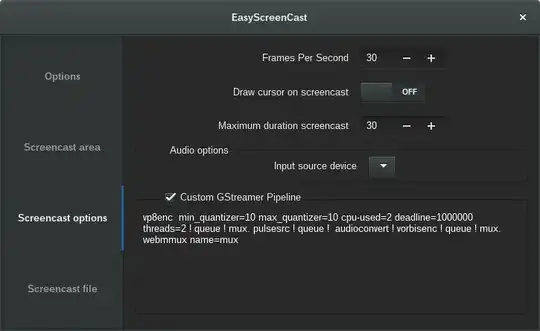
(source code here) which allows you to customize all settings (including draw-cursor). It works fine, I only had to add my gnome-shell version e.g. 3.16.1 - to metadata.json and this custom gstreamer pipeline:
vp8enc min_quantizer=10 max_quantizer=10 cpu-used=2 deadline=1000000 threads=2 ! queue ! mux. pulsesrc ! queue ! audioconvert ! vorbisenc ! queue ! mux. webmmux name=mux
via Tweak-tool > Extensions > Easyscreencast > Screencast options:
That aside, a trivial way to screencast + internal audio is via command line. All you need is to specify the input source for sound recording - either with pacmd (cli) or with pavucontrol (gui) and use gst-launch to record. So, first get the input source name ending with .monitor (that one can record audio from your sound card):
pacmd list-sources | sed -n 's/name: <\(.*\.monitor\)>/\1/p'
    alsa_output.pci-0000_00_1b.0.analog-stereo.monitor
and then run:
pacmd set-default-source "alsa_output.pci-0000_00_1b.0.analog-stereo.monitor"
gst-launch-1.0 ximagesrc ! videoconvert ! queue ! videorate ! vp8enc  min_quantizer=10 max_quantizer=10 cpu-used=2 deadline=1000000  threads=2 ! queue ! mux. pulsesrc ! queue !  audioconvert ! vorbisenc ! queue ! mux. webmmux name=mux ! filesink location=screencast.webm
To stop recording, switch back to terminal and hit Ctrl+C.
1: source


