I'm trying to install MINIX 3 (3.1.0 to be precise). The VMWare installation I have failed to recognize MINIX. I followed the steps shown here:
How do I go about installing this now?
I'm trying to install MINIX 3 (3.1.0 to be precise). The VMWare installation I have failed to recognize MINIX. I followed the steps shown here:
How do I go about installing this now?


I think your issue can be ignored and worked around in the following way.
NOTE: The issue is that VMWare, for whatever reason, is not able to recognize MINIX3 as a known OS.
You're seeing a window similar to this one when you attempt to create a Guest VM using the ISO.
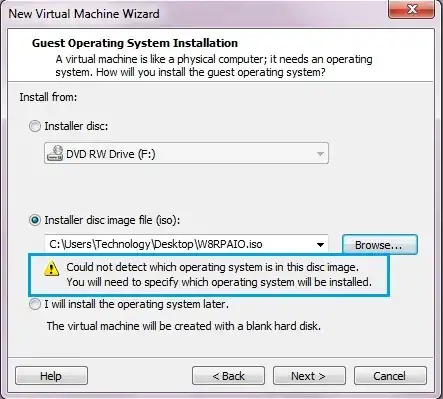
Instead change that option to "I will install the operating system later".
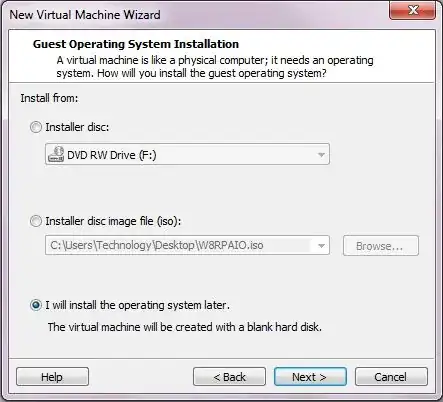
Then proceed to go through the next few dialogs selecting Linux and an OS that is as similar as possible to MINIX, specify how much diskspace to allot it etc.
Once you've done all that you'll get to the screen where you can edit your machine's setup. You'll want to go ahead and do this. NOTE: We're now going to point this Guest VM to your MINIX3 ISO file.
You'll now want to select the CD/DVD device and browse to your ISO file.
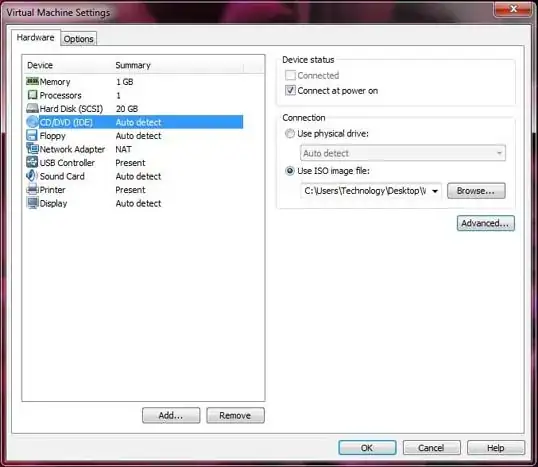
You should then be able to run the installation routine for MINIX3.
NOTE: A method similar to this one can also be used for setting up VirtualBox guests that exhibit similar issues when attempting to install them as well.