I just installed xsane which I already successfully tested with my Epson Perfection V30. When scanning with these settings
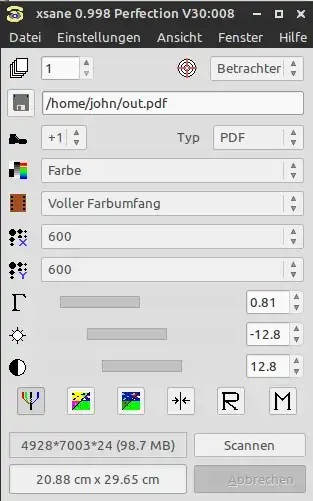
the output file is remarkably large. Is there a way to decrease the size, preferably by built-in settings/options in xsane?
I just installed xsane which I already successfully tested with my Epson Perfection V30. When scanning with these settings
the output file is remarkably large. Is there a way to decrease the size, preferably by built-in settings/options in xsane?

The best way to reduce the size of the image is to save it in a compressed format such as jpg or png. After the scan when the image viewer pops up, select save image and give the filename a .jpg or .png extension. It varies depending on the image, but 600 DPI scan compressed should result in around 0.5MBs.
