4

I want to remap some keys on my keyboard, specifically: page up key to home and page down to end.

On previous versions of GNOME 3 I just created a .xinitrc file that contained:

cat .xinitrc 
xmodmap -e "keycode  117 = End"
xmodmap -e "keycode  112 = Home"

and that was all.

On GNOME 3.8.4 this file takes no effect, and I have to manually: bash .xinitrc, moreover xmodmap settings are lost when I restart gnome shell (which I do sometimes because of a GNOME 3 bug), and also are lost spuriously from time to time.

What is the proper way to remap keys when using GNOME 3.8?

don_crissti
  • 79,330
  • 30
  • 216
  • 245
jb.
  • 719
  • 1
  • 8
  • 20
  • Yes, I use gdm3 for login. – jb. Jan 02 '14 at 07:57
  • This is an old ticket for F16, but might be related to your issue. https://bugzilla.redhat.com/show_bug.cgi?id=845339 – slm Jan 02 '14 at 08:04
  • Seems like .xsession is the correct place for these types of changes. Maybe try that? – slm Jan 02 '14 at 08:05
  • these answers are antiquated since gnome-session-properties has been deprecated https://www.stylesen.org/gnome_3x_startup_applications_debian_jessie – crow May 18 '16 at 20:23

2 Answers2

2

In case someone else stumbles upon this, it is properly discussed here: https://bugzilla.redhat.com/show_bug.cgi?id=873656

Unfortunately .xmodmap is not and will not be supported by Gnome 3 anymore.

Users should migrate their configs to xkb.

1

Sourcing commands during login

I've not tried either .xinitrc or .xsession files to do this, but I have done it using a custom launcher that gets run when I login. You can access the dialog that allows you to do this a couple of ways, I usually just launch it from the command line like so.

$ gnome-session-properties

The GUI looks like this.
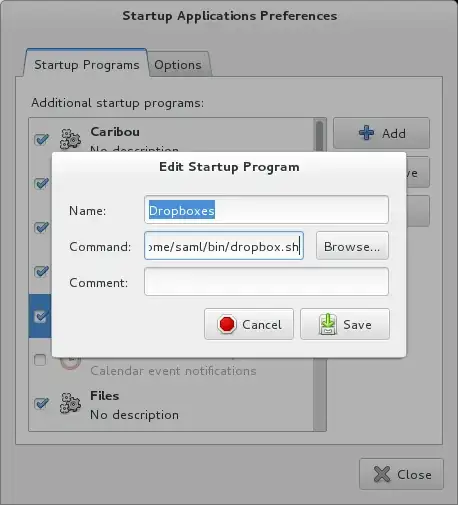
                    ss of gnome session props

From here you can create your own custom startup launchers and then point them to shell scripts that contain what ever commands you need to invoke. Here I've created my own Dropbox launcher script that gets executed when I log in.

Mapping keys to run commands

If on the other hand you're looking to create shortcut key combinations that will launch commands, I've successfully been using XBindKeys on GNOME 3.8.4 for this very purpose.

My use has been modest but I like to create keyboard shortcuts for Nautilus to launch with certain directories opened.

Example

You'll need to first make sure the packages xbindkeys is installed.

Then you'll need to run the following command, one time only, to create a template xbindkeys configuration file.

$ xbindkeys --defaults > /home/saml/.xbindkeysrc

With the file created you can open it in a text editor and add a rule like this:

"nautilus --browser /home/saml/projects/path/to/some/dir"
  Mod4+shift + q

With the above change made we need to kill xbindkeys if it's already running and then restart it.

$ killall xbindkeys
$ xbindkeys

Now with this running any time I type Mod+Shift+Q Nautilus will open with the corresponding folder opened.

Why isn't .xsession or .xinit getting sourced

I believe the ultimate issue lies with this post, titled: Quickly Setting up Awesome with Gnome. It discusses methods for getting GDM (GNOME's Display Manager) into loading these files, which to me implies that it doesn't by default.

My Fedora 19 system contains this file: /usr/share/xsessions/gnome.desktop which contains these lines:

Exec=gnome-session
TryExec=gnome-session
Icon=
Type=Application

I believe gnome-session doesn't source your .xsession file by default, and the .xinit is meant to be sourced if you invoke GNOME using startx.

Be sure to look through the section titled: with GDM, which shows this in more details.

References

slm
  • 363,520
  • 117
  • 767
  • 871
  • This is a very usefull tool, but I want to do a slightly different thing. In your case you wanted to launch a process when user presses keystrokes, I want application to get different keystroke than it was pressed. – jb. Jan 02 '14 at 07:37
  • @jb. - Here I've added a method that I use to run commands such as your `xmodmap` cmds. when I login to my desktop. – slm Jan 02 '14 at 08:16
  • This solves the problem partially: initially shortcuts work, but after restart of ``gnome-shell`` they vanish. I'll accept it and wait for fix of gnome-shell freeze bug. – jb. Jan 02 '14 at 08:28
  • @jb. - ah yes, darn, thought this had the problem licked. – slm Jan 02 '14 at 08:28
  • @jb. - I too have been suffering the restarts of the gnome-shell. It starts to go crazy with memory utilization and I use this to restart it: `pkill -HUP gnome-shell`. Is that your issue as well? – slm Jan 02 '14 at 08:30
  • Precisely thats it. – jb. Jan 02 '14 at 08:56