8

When I use KDE with Awesome WM and get a new message in Skype, Plasma Desktop steals the focus. This drives me crazy as I cannot just continue typing in my current window. Is there some way to prevent this for any open window?

It seems that such a focus steal is prevented by Awesome WM or Plasma, but the window switcher from Plasma still highlights the window. Therefore, the Plasma control bar (the one at the bottom) is un-hidden and therefore stealing the focus itself.

When I did a killall plasma-desktop, the focus stealing stopped. However, I also killed plasma-nm and other things that I'd like to use.

Martin Ueding
  • 2,682
  • 3
  • 31
  • 45

2 Answers2

1

The actual problem was not Skype stealing the focus. Skype just notified the window manager that it had some activity. Then Awesome WM showed the tag (virtual desktop) as having activity. But then the KDE Plasma panel still contained a list of the active windows. In that KDE widget the window with activity was changed and Awesome WM then put the focus to the KDE Plasma panel.

I removed the window list from the Plasma panel and was never bothered again.

Martin Ueding
  • 2,682
  • 3
  • 31
  • 45
0

KDE

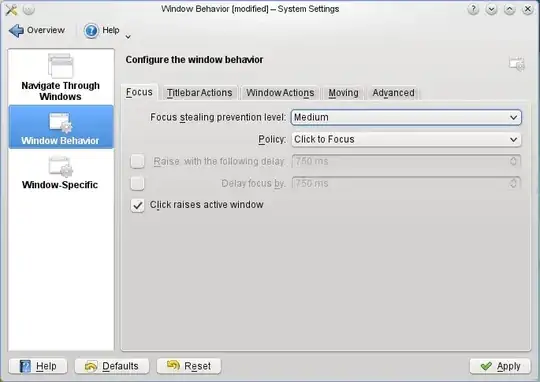
Can you not switch to "click to focus" in KDE to solve this?

   ss of kde

Awesome

I did find this Wiki that discusses what sounds like your issue and it offered this workaround. The wiki topic is titled: Workaround plugins that steal the keyboard focus.

xdotool

There is a very long-standing bug in firefox that allows plugins (Flash, Acrobat, etc) to steal all of the keyboard shortcuts for the window. This is a simple workaround to return the keyboard focus to the top level window:

code

   -- Escape from keyboard focus trap (eg Flash plugin in Firefox)
    awful.key({ modkey, "Control" }, "Escape", function ()
         awful.util.spawn("xdotool getactivewindow mousemove --window %1 0 0 click --clearmodifiers 2")
    end),

NOTE: This workaround requires xdotool to be installed.

move mouse

For example, use Move Mouse to move mouse pointer to a safe location (any area with no links or embedded Flash elements), then call the function below to simulate a mouse click (that brings the focus back).

code

-- Simulate mouse click
local function simulateClick()
    root.fake_input("button_press", 1)
    root.fake_input("button_release", 1)
end

-- Bind it to a key
    awful.key({ modkey, }, "n", function() simulateClick() end),

References

slm
  • 363,520
  • 117
  • 767
  • 871