13

I have a generic install of Centos 5.8 with XFCE 4.4. Pretty much all defaults. As is, after a certain amount of idle time the screen locks (goes black, requires a password to continue).

How do I disable the automatic screen lock?

I've searched around and read suggestions to use the settings manager to modify the Power Manager or Screen Saver settings but neither of those settings managers/panels/icons are installed on my desktop.

UPDATE:

It appears gnome-screensaver is being started automatically. Of course I could remove that program from the system, but I'd prefer to understand what's going on and use more ordinary configuration methods to prevent it from automatically starting and at the same time keep the option of switching back to it if needed.

Old Pro
  • 1,272
  • 3
  • 10
  • 20

5 Answers5

7

ps aux | grep screen revealed that gnome-screensaver was running.

whereis gnome-screensaver found it in /usr/bin (among other places).

Also in /usr/bin/ was gnome-screensaver-preferences

Solution: run /usr/bin/gnome-screensaver-preferences and uncheck "Lock screen when screensaver is active". Optionally uncheck "Activate screensaver when computer is idle".

Old Pro
  • 1,272
  • 3
  • 10
  • 20
2

Is gnome-screensaver listed and ticked in Applications, settings, session and startup, application autostart? If so, untick it to stop it from starting.

If you don't have the Session and startup menu, you can do same thing checking for a gnome-screensaver file in the autostart directory. $HOME/.config/autostart


Try checking whether there is an active gconf setting that sets gnome-screensaver to start. Per the xscreensaver manual, a

gconftool-2 --type boolean -s /apps/gnome_settings_daemon/screensaver/start_screensaver false

command stops gnome-screensaver from starting. This means that if you want to see the current setting, you may want to try `

gconftool-2 -g /apps/gnome_settings_daemon/screensaver/start_screensaver

using '-g' instead of '-s' to get instead of set.

  • I have a "Sessions and Startup Settings" menu item that brings up a "Sessions and Startup" window, but there is no "application autostart" and the only option that is checked is "Prompt on logout". The only thing in `$HOME/.config/autostart/` is `xfce4-tips-autostart.desktop` and all it has is `[Desktop Entry] Hidden=true` – Old Pro Sep 15 '12 at 03:22
  • Added second possible step for solution. –  Sep 15 '12 at 12:55
  • It had been set to true. I set it to false. That did not prevent `gnome-screensaver` from automatically starting. – Old Pro Sep 16 '12 at 20:17
1

CentOs:
Applications -> System Tools -> Settings -> Privacy -> Screen Lock -> Disable it.

If you don't find Privacy search for lock and you will find the related search check which option says automatic screen lock.

Vishrant
  • 121
  • 1
  • 6
0

Found this:

Install gconf-editor from Add/Remove Software, then go to 
Applications --> System Tools --> Configuration Editor. 
Under Apps --> Panel --> Global look for "disable_lock_screen"
If it is checked, uncheck it.

I haven't tried it out, but it sounds promissing.

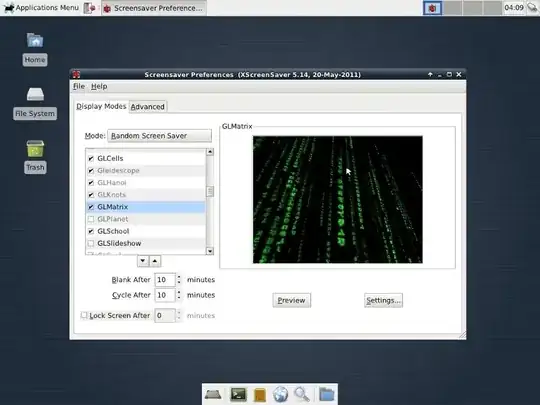
Also, you could use the command xfce4-settings-manager to open this window:

enter image description here

Here, uncheck the 'Lock screen after' option, or set a different time. Please comment if you succed or not.

Marius Cotofana
  • 976
  • 1
  • 6
  • 11
  • I don't have `xfce4-settings-manager` or `xfce-settings-manager` on my system. I tried installing `gconf-editor` and checking `disable_lock_screen` but that did not stop the screen from automatically locking, as could be predicted from the description: "If true, the panel will not allow a user to lock their screen, by removing access to the lock screen menu entries." – Old Pro Sep 13 '12 at 04:29
  • 1
    @Old Pro - Is there a reason you don't want to install `xfce4-settings-manager`? After all, you are asking about how to change a desktop setting... – ire_and_curses Sep 13 '12 at 04:43
  • @ire_and_curses I don't mind installing `xfce4-settings-manager` but the OP didn't mention installing it and the screenshot refers to XScreenSaver which also isn't on my system, so it seems unlikely to help. – Old Pro Sep 13 '12 at 21:28
-1

Press Alt + f2 to execute a program

type: xscreensaver-demo then hit enter

Then uncheck "Lock Screen After" checkbox

Jorge V.
  • 419
  • 5
  • 12
  • 1
    `Alt + F2` did not bring up a command prompt. I do not have `xscreensaver` or `xscreensaver-demo` on my system. `The command "xscreensaver-demo" failed to run: Failed to execute child process "xscreensaver-demo" (No such file or directory)` – Old Pro Sep 13 '12 at 00:53